cloud SaaS incident response
Cloud and SaaS Incident Response
Cloud and SaaS incident response handles security events in environments where infrastructure, identity, applications, logs, and administration are distributed across the organization and one or more providers. The incident may involve a cloud account, subscription, project, SaaS tenant, identity provider, workload, storage bucket, API key, OAuth grant, serverless function, managed database, collaboration platform, or third-party integration.
This article is part of the Incident Response pillar. It builds on Cloud Network Security, Authentication Factors and MFA, Logging, Auditing, and Time Sync, Log Analysis and Timeline Building, and Vendor and Supply Chain Risk.
The main difference from traditional host response is control. In a self-managed environment, responders may image disks, inspect hypervisors, collect raw logs, or disconnect equipment directly. In cloud and SaaS environments, many response actions happen through provider APIs, tenant controls, audit logs, snapshots, support cases, and identity systems. The team must understand which controls it owns, which controls the provider owns, and which evidence must be requested before it disappears.
In plain terms
Responding to an attack in cloud and SaaS is like responding inside rented, distributed infrastructure. You still own your identities, data, configuration, and business decisions, but you do not own every layer that produced the event.
A strong cloud and SaaS response knows which buttons the tenant can press, which logs must already be enabled, which provider support request is needed, and how to stop re-entry through sessions, keys, grants, roles, and integrations.
TL;DR
- Cloud and SaaS response starts with the shared responsibility boundary.
- Identity is often the control plane because users, administrators, tokens, OAuth grants, service principals, and API keys can reach many services.
- Logs must be enabled and retained before the incident; missing cloud logs can make scope impossible to prove.
- Containment should stop re-entry without destroying evidence.
- SaaS response often focuses on sessions, sharing, delegated access, inbox rules, app grants, tenant settings, and audit exports.
- Cloud workload response often focuses on keys, IAM, network isolation, snapshots, storage access, workload rebuilds, and configuration drift.
- Recovery rebuilds trust in identity, secrets, configuration, data, logging, and provider-side records.
Shared responsibility shapes the investigation
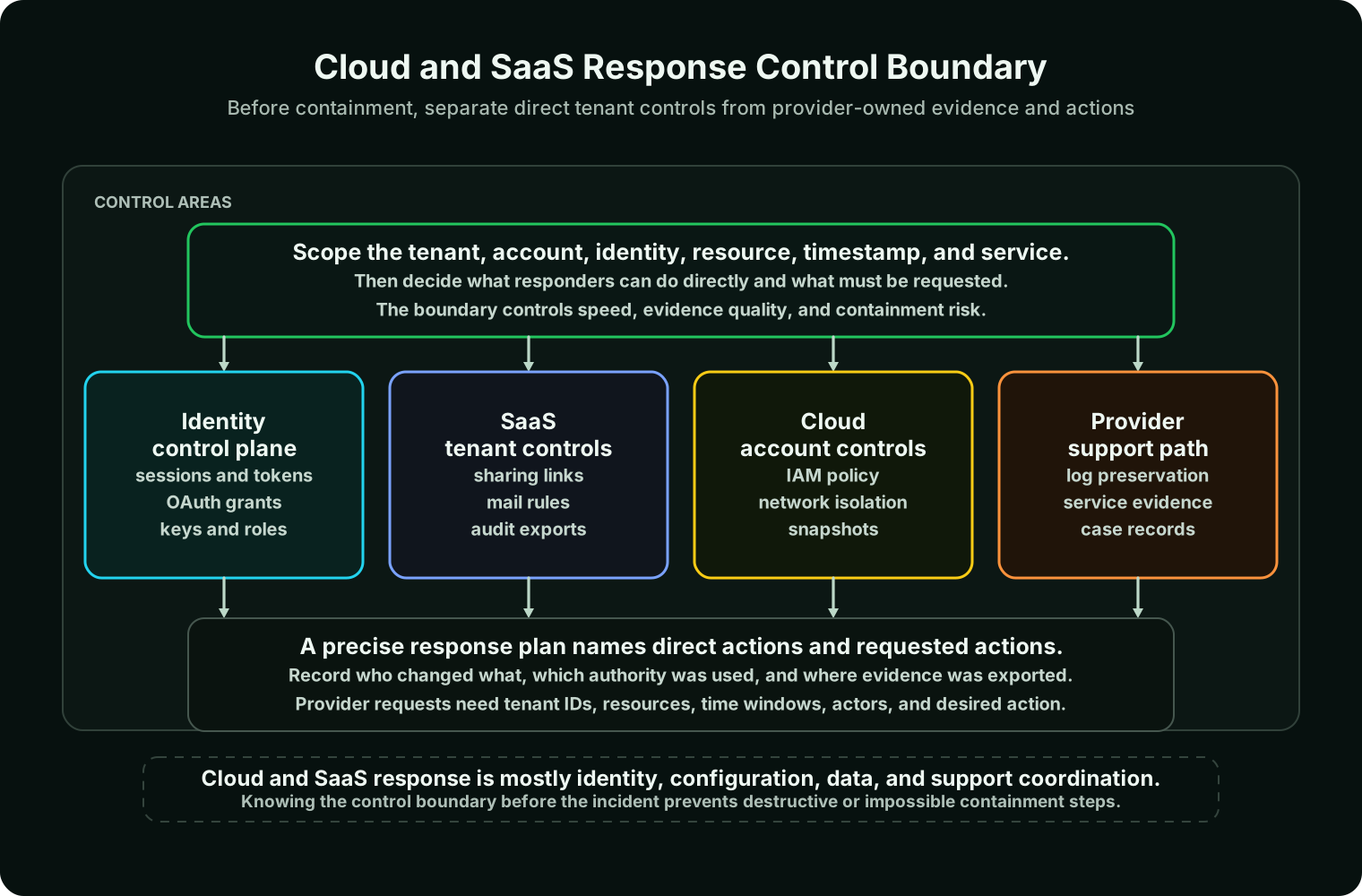
The shared responsibility model determines what the organization can do directly during an incident. In infrastructure as a service, the organization usually controls operating systems, applications, identities, data, network configuration, and many logs. In platform as a service, the provider manages more of the underlying platform, while the organization still owns application behavior, data, identity, secrets, and configuration. In SaaS, the provider runs the application and infrastructure, while the tenant usually controls identity integration, user access, sharing, data governance, app configuration, and available audit features.
For incident response, this boundary is not an abstract compliance diagram. It decides where evidence lives, who can preserve it, who can export it, who can isolate a resource, and whether a support case is needed. A suspicious mailbox forwarding rule, a malicious OAuth consent grant, a public storage bucket, and a compromised cloud administrator all require different actions because the control boundary is different.
The boundary should be documented before the incident. The team should know which logs exist, how long they are retained, which plans or licenses are required, who can export them, which containment actions are tenant-controlled, and which actions require provider support. Learning those facts during an active compromise wastes time and may allow log retention windows to expire.
Treat identity as the first control plane
Many cloud and SaaS incidents are identity incidents with cloud consequences. A compromised user may access files, consent to a malicious application, create inbox rules, download reports, or synchronize data. A compromised administrator may disable logging, change retention, create new app registrations, alter sharing settings, or grant persistence. A leaked API key may launch compute, enumerate storage, copy data, change networking, or create additional credentials.
Identity containment usually has to address more than a password. Modern cloud access may involve active sessions, refresh tokens, app passwords, OAuth grants, service principals, workload identities, federation trust, emergency accounts, API keys, and CI/CD secrets. Rotating one secret is not enough if the actor can still create another secret, refresh an existing token, or authenticate through a compromised identity provider.
For federated environments, responders should check both sides of the trust relationship. Revoking a SaaS session may not help if the attacker can immediately sign in again through the identity provider. Disabling a user in the identity provider may not remove a malicious OAuth grant that already exists in the SaaS tenant. A clean response follows the authentication path from initial sign-in through token issuance, consent, role use, API activity, and resource access.
Scope the tenant, account, actor, and resource
Cloud resources often have friendly names that are not unique enough for response. A precise investigation uses tenant IDs, account IDs, subscription IDs, project IDs, resource IDs, object keys, workload identifiers, user IDs, app IDs, request IDs, event IDs, source IPs, user agents, regions, and timestamps with timezones. Precision prevents the team from containing the wrong resource or asking the provider to search an ambiguous scope.
The first response question is not simply "what happened?" It is "which identity or key did what action against which resource, from where, through which service, with which result, and what evidence proves it?" That sentence becomes the backbone of the timeline. It also separates an active incident from a configuration weakness. A public bucket is exposure risk; object access logs, download records, or provider-side evidence are what support an access conclusion.
Scope should also include persistence. In SaaS, persistence may be an inbox forwarding rule, delegated mailbox access, a third-party app grant, a sharing link, a token, or an administrator role assignment. In cloud infrastructure, persistence may be a new access key, a trust policy, a workload identity binding, a modified CI/CD secret, a new network path, or a scheduled function. Containment that ignores persistence gives the actor a path back in.
Preserve evidence before cleanup
Cloud and SaaS response often tempts teams to delete the suspicious object immediately. That can be appropriate when a resource is actively causing harm, but responders should understand what evidence will be lost. Deleting a user, rule, function, instance, disk, app registration, log group, or storage object may destroy timestamps, metadata, configuration, or access traces that are needed for scoping and legal review.
Evidence preservation is usually a combination of log export, configuration export, snapshotting, metadata capture, screenshots where appropriate, support case records, and copies of relevant application logs. For workloads, a disk snapshot before shutdown may preserve artifacts. For SaaS, an audit log export, object metadata export, sharing report, app-consent export, or mailbox audit export may be the best available record. For cloud accounts, copies of activity logs, IAM policies, key metadata, network flow logs, object access logs, and provider request IDs can be decisive.
Retention is a practical constraint. Some logs are not enabled by default. Some require premium licensing or specific service configuration. Some are retained for a short period. Some provider evidence may only be accessible through support. Preparation determines whether the response team has proof or only reasonable suspicion.
Contain without breaking the investigation
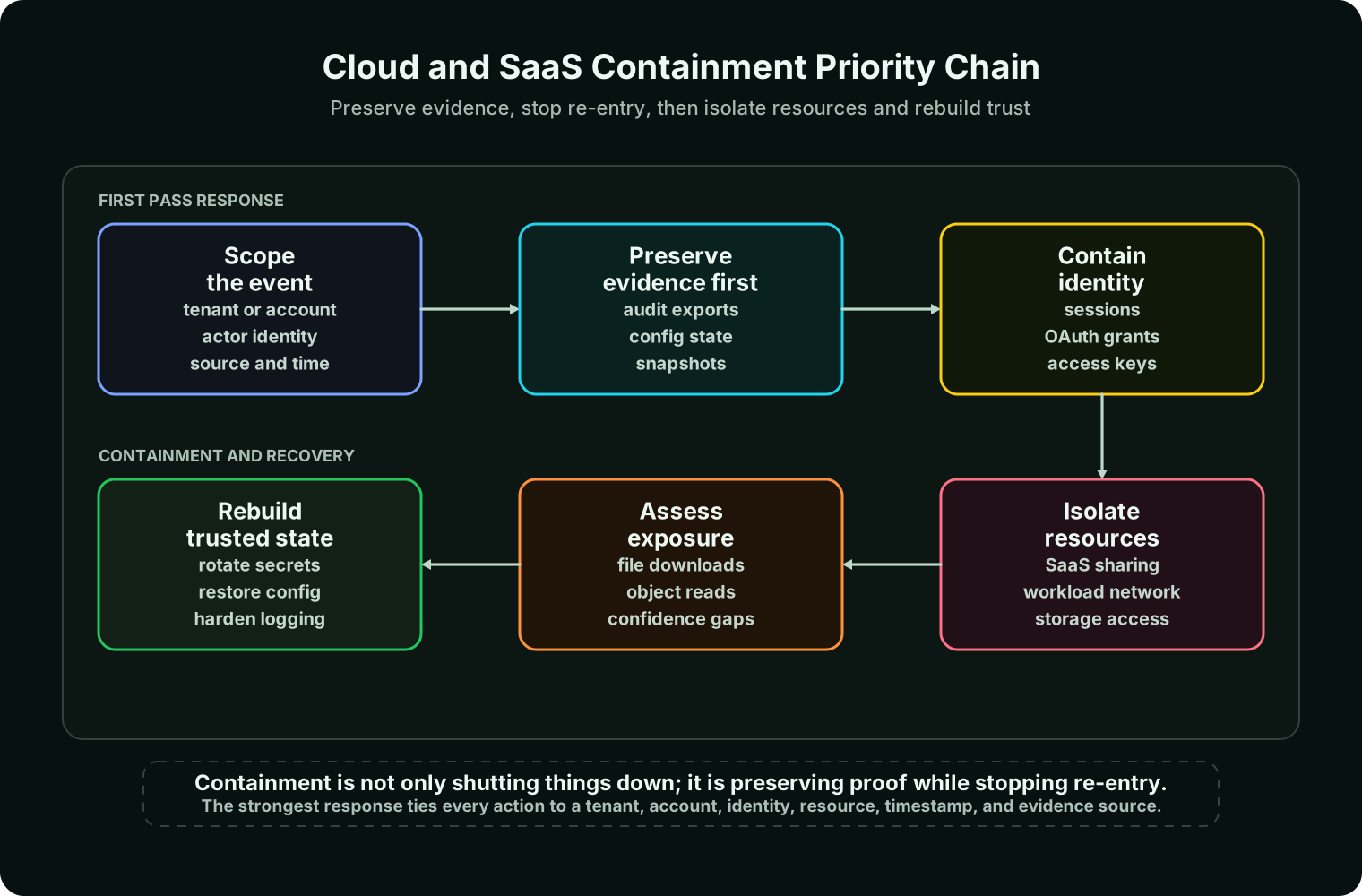
Containment should stop the actor's next action while preserving enough evidence to prove what already happened. In SaaS, this may mean revoking sessions, disabling affected accounts, removing malicious inbox rules, disabling external forwarding, revoking third-party app grants, restricting public sharing, removing anonymous links, suspending compromised administrators, and exporting tenant logs. In cloud infrastructure, it may mean disabling access keys, changing IAM permissions, isolating an instance through network controls, detaching a workload from a load balancer, snapshotting disks, blocking egress, pausing deployments, restricting object storage, or copying logs to a protected account.
The best action depends on current harm. If a workload is actively exfiltrating data, network isolation may come before perfect evidence collection. If the actor is no longer active, responders may have time to snapshot, export, and document before cleanup. Each action should record who performed it, when it happened, which resource it changed, and why that action was chosen.
Containment also needs an order of operations. If an administrator is compromised, disable the admin path before rotating secrets the attacker can still read. If a service principal is abused, remove permission to create new credentials before rotating the existing credential. If a malicious integration caused SaaS access, revoke the grant before resetting only the end user's password. The goal is to close the path, not just one symptom.
Build the timeline around API and tenant activity
Cloud timelines should distinguish event time from ingestion time. A cloud service may record an API call at one time, the logging pipeline may deliver it later, and the SIEM may normalize it later still. Using ingestion time as if it were event time can make containment appear earlier or later than it was. The timeline should preserve provider event IDs and original timestamps so investigators can trace back to source evidence.
The timeline should also distinguish console activity from API activity. A human using a browser, an attacker using scripted API calls, a CI/CD pipeline, a serverless function, and a managed service may all create events under different identities and user agents. The interpretation matters because it changes containment. A compromised human account leads to session and identity response. A leaked key leads to key rotation, permission review, source-code search, and secret exposure analysis. A compromised pipeline leads to CI/CD and source control review.
For SaaS file or email incidents, the timeline usually follows sign-in, MFA result, suspicious rule or grant creation, file search, file access, sync or download, external sharing, forwarding, deletion, and session revocation. For cloud infrastructure incidents, it may follow key creation, permission discovery, resource enumeration, storage reads, network changes, compute launch, snapshot creation, data transfer, destructive actions, and cleanup. A useful timeline explains both what happened and what remains unknown.
Use provider support as a precise instrument
Provider support can help preserve logs, clarify service-specific behavior, access provider-side records, investigate abuse, and perform emergency actions that are outside tenant control. Support is most effective when the request is specific. A weak request says, "Please check if we were hacked." A strong request gives the tenant or account ID, affected service, resource identifiers, suspicious actor, source IP, timestamps with timezone, event IDs, business impact, urgency, and the exact action requested.
Useful support requests ask for concrete outcomes: preserve audit logs for a defined tenant and time window, confirm whether object storage access logs show downloads by a named key, escalate a suspected administrator compromise, or clarify whether a provider-side event explains an alert. The support case itself becomes evidence, so responders should preserve case numbers, timestamps, contacts, provider statements, and actions taken.
Support does not replace tenant response. Providers can help with their platform, but the organization usually owns identity, data classification, tenant configuration, customer-managed keys, workload code, application behavior, and many logs. A good response uses provider support to fill gaps and confirm facts, not to outsource judgment.
Assess data exposure with evidence and confidence
Cloud and SaaS incidents often become data exposure investigations. The response team must separate exposure, access, and confirmed exfiltration. A storage bucket configured for public access is an exposure. Logs showing object reads from an unauthorized source are evidence of access. Download volume, sync records, provider logs, endpoint evidence, or network telemetry may support exfiltration conclusions. When logging was absent, the conclusion should state the gap rather than converting missing evidence into proof of safety.
Data exposure analysis should follow the path of the data. For SaaS, that may include file access, search activity, sync clients, report exports, mailbox access, forwarding rules, external sharing links, delegated access, and third-party app permissions. For cloud infrastructure, it may include object storage reads, database exports, snapshots, data warehouse queries, key management logs, unusual egress, cross-region transfer, and provider data access logs where available.
The final statement should be honest about confidence. "The folder was shared anonymously for six days, but audit logging did not include download events for this plan" is more useful than "no evidence of access" without context. Precision matters for legal review, customer communication, regulatory notification, and remediation priorities.
Recover trust, not only service
Recovery in cloud and SaaS is not finished when the alert closes. The team has to rebuild trust in identity, secrets, configuration, workloads, data, and monitoring. That may require revoking malicious grants, rotating keys, resetting passwords, re-enrolling MFA devices, reducing excessive roles, restoring tenant configuration, making exposed storage private, removing public links, rebuilding workloads from trusted images, redeploying from clean pipelines, patching vulnerable applications, restoring clean data, and validating logging.
Configuration drift deserves special attention. Attackers may leave behind subtle changes that do not look like malware: new trust policies, altered security groups, permissive storage lifecycle rules, hidden forwarding rules, suspicious app registrations, disabled logging, weaker retention, or changed conditional access policy. Recovery should compare current configuration with known-good baselines and review changes made during the incident window.
Post-recovery monitoring should assume some uncertainty. Watch for reused source IPs, user agents, app IDs, keys, commands, role changes, sharing changes, token use, and storage access patterns. If the original compromise path is not fully understood, monitoring is part of the trust decision rather than an optional afterthought.
Walkthrough: malicious SaaS OAuth grant
A user clicks a phishing link and consents to a third-party application that requests file and mailbox access. The attacker does not need the user's password after the grant exists. Resetting the password may stop new interactive sign-ins, but it may not remove the application permission that continues to access data.
The response starts by identifying the app ID, user, consent time, permissions, sign-in activity, and accessed resources. The team exports audit logs, revokes the grant, revokes user sessions, reviews other users for the same app, checks file and mailbox activity, and determines whether data was accessed or shared. Recovery includes user education, consent policy review, app governance, and detections for unusual grants.
Walkthrough: exposed cloud access key
A cloud access key appears in a public repository. The team rotates the key immediately, but that alone does not answer the incident. The important questions are when the key was exposed, what permissions it had, whether it was used, from which sources, against which resources, and whether the actor created additional access.
A strong response searches code history, identifies the owning identity, exports API activity, disables or replaces the key, removes excessive permissions, reviews storage and compute activity, checks for new keys or trust policies, and validates that workloads using the key still function through a safer secret path. Recovery should also fix the pipeline or developer workflow that allowed the key to reach the repository.
Walkthrough: cloud workload compromise
A public-facing cloud workload begins contacting suspicious destinations. The team could terminate it immediately, but termination may erase volatile context or make disk evidence harder to collect. If the workload is actively harming others, network isolation comes first. If the activity is contained, responders snapshot the disk, preserve instance metadata, export logs, detach from load balancers, block egress, and compare the workload against the deployment baseline.
Recovery should not simply restart the same image. The team identifies the entry point, patches or hardens the application, rotates secrets available to the workload, redeploys from a trusted image, validates network controls, and monitors for recurrence. The cloud snapshot supports investigation; the clean deployment supports recovery.
Practice Exercise: Choose Cloud and SaaS Response Priorities
Review the three incident notes below. For each one, choose the most important evidence to preserve first, the first containment action that closes the likely access path, and the exposure statement that can be made without overstating the facts.
| Incident note | Known facts | Your task |
|---|---|---|
| Suspicious SaaS app consent | A user approved a third-party app with file and mailbox permissions. Sign-in logs show the user completed MFA. File activity logs are enabled, but the audit export has not been preserved yet. | Pick the evidence export, containment action, and exposure wording. |
| Exposed cloud access key | A developer key appeared in a public repository. The key has storage read permissions and can list compute resources. Activity logs are available for 30 days. | Pick the evidence export, containment action, and exposure wording. |
| Compromised cloud workload | A public workload is making unusual outbound connections. It has access to application secrets through its runtime role. Disk snapshots are available, and the workload is still running. | Pick the evidence export, containment action, and exposure wording. |
Expected Answer
| Incident note | Evidence to preserve first | First containment priority | Careful exposure statement |
|---|---|---|---|
| Suspicious SaaS app consent | Export SaaS audit logs, app consent details, user sign-in records, mailbox and file activity, app ID, permission set, and session data before cleanup. | Revoke the malicious app grant and active sessions, then review other users for the same app before relying on password reset alone. | The grant created a data-access path. Confirmed access depends on file, mailbox, and application audit evidence. |
| Exposed cloud access key | Export source-control exposure timing, key metadata, cloud API activity, storage access logs, identity permissions, and any key creation or policy-change events. | Disable or rotate the key, reduce the identity permissions, and check whether the actor created additional credentials or trust paths. | The key was exposed and had storage read capability. Confirmed data access requires matching activity or storage access evidence. |
| Compromised cloud workload | Capture disk snapshot, instance metadata, runtime role permissions, application logs, network flow records, destination list, and secret-access logs where available. | Isolate outbound network access if harm is active, then rotate secrets available to the workload and redeploy from a trusted baseline. | The workload showed suspicious outbound behavior. Data exposure confidence depends on egress, application, secret-use, and storage evidence. |
The pattern is the same in each case: preserve source evidence, close the real access path, and describe exposure based on proof rather than fear or assumptions.
Common pitfalls and misconceptions
SaaS incidents are low risk because no server was compromised
SaaS incidents can involve regulated data, mailbox access, file downloads, customer records, administrator changes, public sharing, and malicious integrations. The provider infrastructure may be healthy while the tenant is still compromised.
Password reset is enough
Password reset may not revoke sessions, refresh tokens, OAuth grants, API keys, app passwords, delegated access, or service principal credentials. Identity containment must match the actual access path.
Public exposure proves exfiltration
Public exposure is serious, but exposure and confirmed access are different findings. Data exposure conclusions should state what logs prove, what logs do not cover, and how confident the team is.
Deleting the resource fixes the incident
Deletion may stop harm, but it can also destroy evidence. When time allows, export logs, capture configuration, snapshot workloads, and record metadata before cleanup.
The provider owns the whole response
The provider owns parts of the platform. The organization still owns tenant configuration, identity, data decisions, workload code, many logs, communications, and remediation. Provider support is a partner in the response, not the response itself.
Practical operating standard
- Document shared responsibility boundaries, log sources, retention limits, support paths, and emergency contacts for each critical cloud and SaaS platform.
- Prepare tenant-level procedures for revoking sessions, app grants, API keys, service principals, administrator roles, sharing links, and risky integrations.
- Centralize cloud and SaaS audit logs where possible, and protect exported evidence from the affected tenant or account.
- Preserve logs, metadata, configuration, support case records, and snapshots before destructive cleanup when the risk allows.
- Build timelines from source event time, provider event IDs, actor identity, source, action, resource, result, and interpretation.
- Assess data exposure by separating exposure, access evidence, exfiltration evidence, and logging gaps.
- Recover by rebuilding trust in identity, secrets, configuration, workloads, data, logging, and monitoring.
How this connects to the lifecycle
Preparation ensures logs, access, provider contacts, tenant controls, and evidence export procedures exist before the incident. Detection and triage classify whether the event is identity abuse, SaaS tenant compromise, cloud workload compromise, data exposure, or provider-reported activity. Containment revokes sessions, keys, grants, roles, integrations, and risky resource access. Forensics preserves logs, snapshots, metadata, configuration, and provider case records. Recovery rebuilds trust in identities, workloads, data, and tenant settings. Communication explains impact without overstating evidence. Post-incident review turns the lessons into stronger identity, logging, configuration, vendor, and resilience controls.
Cloud and SaaS response is therefore not a separate discipline from incident response. It is the same lifecycle applied to distributed control planes, provider-owned infrastructure, tenant-owned configuration, and identity-driven access.
Authoritative references
- NIST SP 800-61 Rev. 3, Incident Response Recommendations and Considerations for Cybersecurity Risk Management
- CISA Secure Cloud Business Applications Project
- AWS Shared Responsibility Model
- Microsoft Azure shared responsibility in the cloud
- MITRE ATT&CK Cloud Matrix
FAQ
Is a SaaS incident really an incident if no server was compromised?
Yes. Unauthorized SaaS access, malicious sharing, OAuth abuse, mailbox compromise, tenant administration changes, and data exposure can be serious incidents even when the provider infrastructure is operating normally.
What is the first containment action in a cloud incident?
Often it is identity containment: revoke sessions, disable keys, remove malicious grants, and reduce permissions. If a workload is actively causing harm, network or compute isolation may come first.
Can the provider investigate everything for us?
No. Providers can help with their platform and provider-side records, but the organization usually owns tenant configuration, identities, customer data, workload behavior, business impact analysis, and many logs.
What if logging was not enabled?
Document the gap honestly. Use remaining evidence such as identity logs, network logs, endpoint telemetry, storage metadata, application logs, provider support, and user reports. Then fix logging and retention as a post-incident action.